
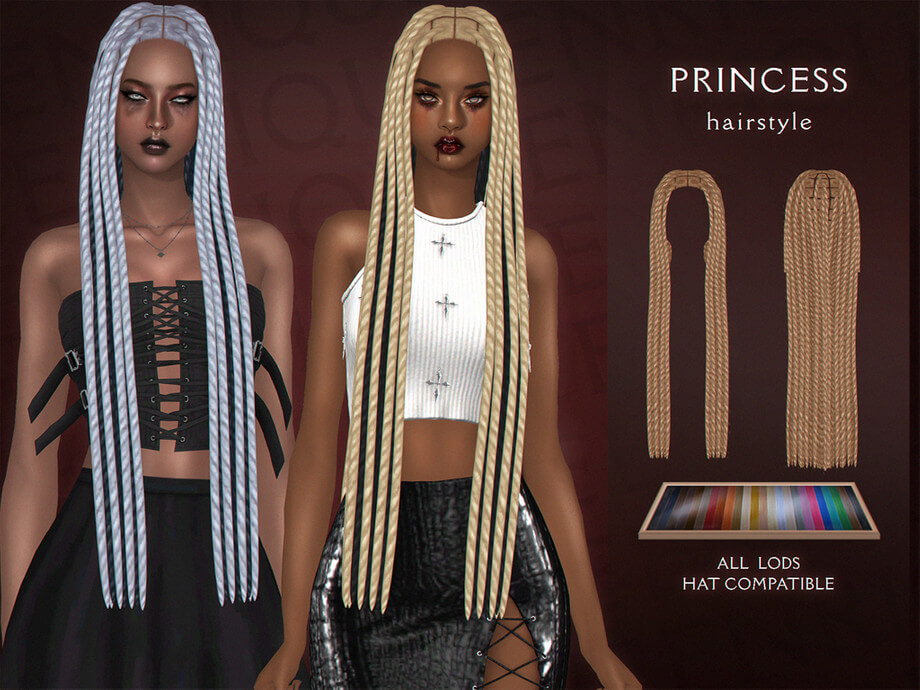
Upgrading textured natural hairstyles in Create-a-Sim remains an essential pursuit for players who want authentic diversity across their generational neighborhoods. While recent official updates improved EA’s selection of afro-textured options, finding sculpted formal updos that carry genuine royal elegance without collapsing into flat low-resolution geometry is still tricky. The Princess Hairstyle Black Sims 4 CC caught my attention on The Sims Resource because it delivers a towering, regal updo specifically designed for Black Sims. Featuring twenty-four color swatches, full LOD mapping, teen through elder frame compatibility, and custom hat morphs, I downloaded the package to see how the crown volume and hairline detailing hold up in live mode.
Princess Hairstyle Black Sims 4 CC Sculpted Crown Architecture
The silhouette of this hairstyle centers on a high, rounded bun anchored right at the crown of the head, paired with smoothly pulled-back side sections and delicate edge detailing along the forehead. The creator sculpted actual surface definition into the bun rather than relying on a flat texture wrap over a generic sphere. You can see individual coil clusters and wrapped twist sections that give the updo palpable structural weight.
The front hairline is treated with care. Many older custom hairs draw sharp, artificial baby hairs directly onto the scalp texture, which can look jarring when paired with custom skin details or high-definition face overlays. Here, the edges are sculpted into the mesh perimeter with soft, natural curves that mimic carefully laid edges. It frames the brow line cleanly, allowing bold makeup looks and oversized statement earrings to take center stage without awkward clipping.
When curating family members across generations, pairing this regal look alongside casual masculine textured styles like the Darwin Hair establishes cohesive visual storytelling. It delivers the kind of stately poise that immediately communicates status, making it well-suited for high-profile business moguls, politicians, or community leaders.
The nape of the neck is modeled cleanly as well. When your Sim turns around or changes into backless gowns, there are no jagged vertices or floating hair strands hovering awkwardly off the skin. The updo feels anchored to the skull naturally from every camera angle.
Twenty-Four Swatch Palette and Clay Texture Detailing
The download provides twenty-four color swatches that align closely with EA’s standard palette, allowing the hair to blend naturally into Maxis Match game worlds. The collection includes rich onyx blacks, deep espresso browns, auburns, warm chestnuts, and rich ginger shades. Alongside the natural tones, players will find a selection of fashion pastels including soft lavender, icy silver, rose gold, and deep royal indigo.
The texture work adheres to the classic Maxis clay aesthetic while introducing micro-ridges that convey tight curl definition. Instead of glossy alpha strands that shimmer awkwardly in daylight, the clay strands absorb ambient lighting with a balanced matte finish. When viewing your Sim under the harsh midday sun of Sulani or the overcast skies of Willow Creek, the bun maintains its rich depth without blowing out into plastic white highlights.
The specular map is carefully tuned. Low-end custom hairs frequently produce an oily film across darker hair swatches under indoor lighting. The creator calibrated the specular gloss values so that highlights gather naturally along the curved crests of the twists, giving the hair realistic sheen that respects the game’s lighting engine.
Hat Chop Geometry and LOD Mesh Optimization
High updos are notorious for breaking when Sims put on winter beanies, formal fascinators, or baseball caps. Some creators simply disable hat compatibility altogether, forcing the hair to disappear or poke directly through the crown of the headwear. The creator of this mesh took the time to author a dedicated hat chop model.
When you select a hat in Create-a-Sim, the top bun tucks away smoothly while the pulled-back sides and styled hairline remain intact around the headwear band. A wide-brim sun hat rests cleanly against the forehead without clipping through the nape of the neck or leaving visible gaps of scalp. This makes the hairstyle practical for seasonal outdoor wear during cold winters and summer beach excursions.
Performance optimization across all four LOD levels is another major plus. At LOD0, every twist and hairline ripple remains crisp during close-up portrait photography. As the camera retreats to neighborhood view at LOD2 and LOD3, the polygon count scales down gradually without causing sudden geometry pop-in or distorted vertex spikes. Rotational players running large legacy saves will appreciate that this hair does not degrade performance during bustling community lot gatherings.
Formal Galas and Legacy Matriarch Gameplay
To see how the updo behaves during real gameplay interactions, I assigned it to a legacy matriarch Sim attending a high-society charity gala at the Starlight Boulevard lounge in Del Sol Valley. The updo stays rock solid during dynamic animations. When the Sim laughs, gestures expressively, or dances to live piano music, the high bun follows the head rig accurately without rubbery stretching or wobbling off-center.
Compatibility across age groups is consistent from teenagers through elders. On elder Sims, pairing the silver or charcoal swatches with formal evening gowns creates an aura of dignified authority that fits family elders presiding over holiday dinners. The mesh sits comfortably above high-collared dresses, blazer lapels, and chunky necklaces without ugly cloth clipping.
For players seeking polished representation and versatile formal styling for their Black Sims, this package offers a refined, beautifully balanced solution. It combines respectful cultural aesthetics with dependable technical execution, making it a reliable addition to any Maxis Match hair folder.