
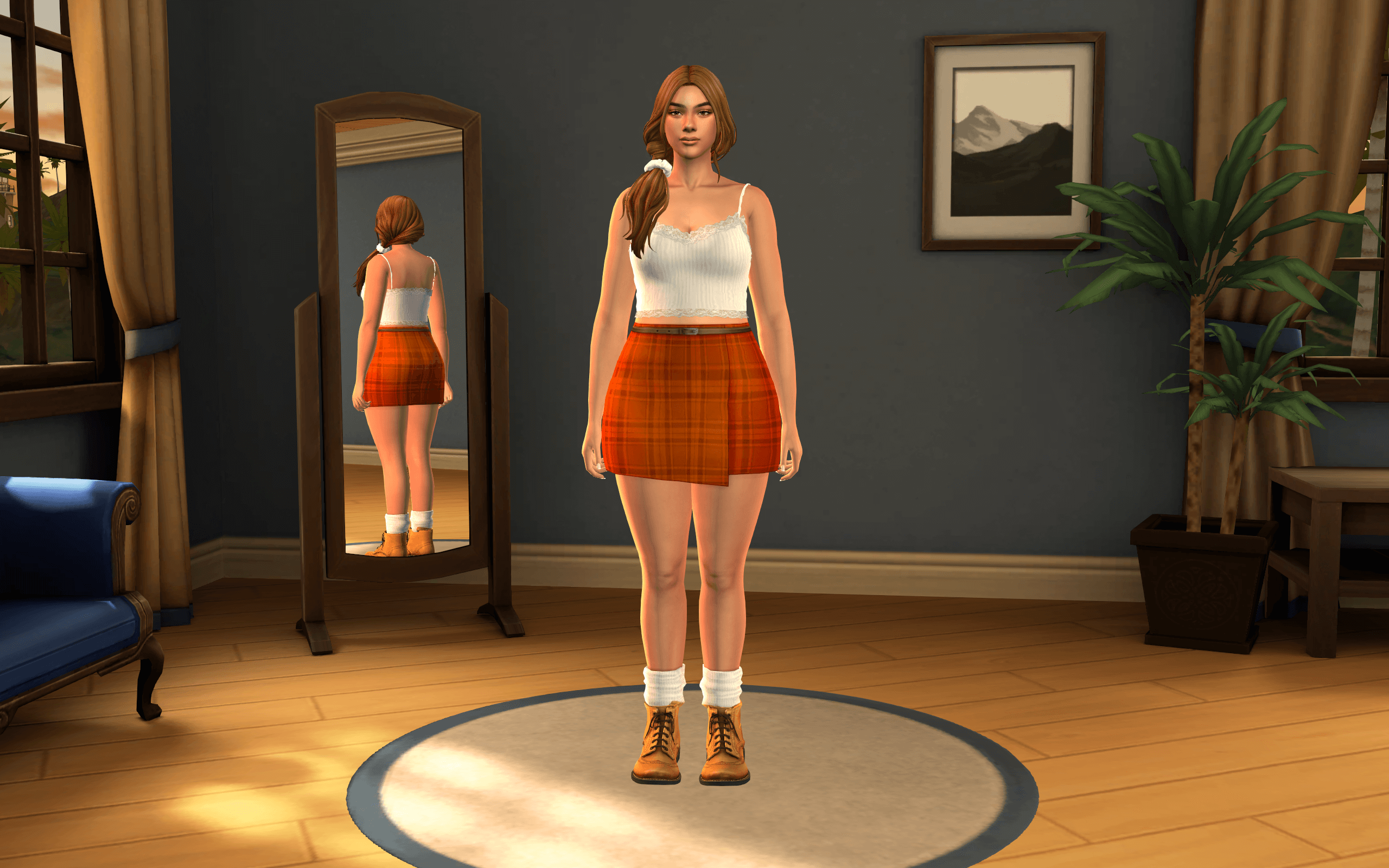
Staring at the flat purple-gray void of the default Create-a-Sim screen for hundreds of hours drains creative inspiration faster than a malfunctioning needs bar. The Sims 3 CAS Background Sims 4 Mod solves this visual fatigue by transporting players back to the classic 2009 styling studio aesthetic. Anyone who spent endless late nights customizing Sims during the third generation of the franchise remembers the moody circular studio floor, the soft teal-blue wall gradient, and the polished studio lighting that gave character models rich physical presence. Creator vyxated painstakingly recreated that exact environment as a complete replacement package, turning everyday styling sessions into a deeply comforting nostalgia trip.
When loading a household into CAS to dress a multi-generational family, the visual contrast compared to base game styling screens is striking. Instead of an empty illuminated puddle floating in an ambiguous vacuum, your Sim stands inside a believable 3D styling bay. The subtle gradient on the curved back wall draws your eye directly to clothing silhouettes, while the gentle ambient reflections ground footwear firmly onto the floor. It completely changes how custom content textures present during testing, helping you evaluate fabric weaves and hair highlights without fighting EA’s default greenish backlight tint.
The Sims 3 CAS Background Sims 4 Mod Visual Room Setup
The core visual asset in this package is the curved circular studio backdrop that defined the CAS experience of 2009. The creator captured the soft, vignetted blue-cyan wall gradient with remarkable fidelity, ensuring the color transition remains smooth without banding artifacts on high-resolution monitors. Back in the day, that specific blue wall was where simmers spent hours testing pattern swatches in Create-a-Style. While The Sims 4 lacks native color wheels, having this visual anchor immediately evokes the feeling of crafting characters in Sunset Valley or Riverview.
What sets this backdrop apart from simple two-dimensional flat picture overrides is its geometric spatial depth. The subtle curvature around the perimeter catches ambient shadows naturally as you rotate the camera around your Sim. The floor platform features a soft radial falloff that prevents clothing hems and shoes from blending indistinctly into the floorboards. When rotating a full-body model to inspect shoe geometry or back-pocket details, the circular ground perspective provides a reliable spatial reference that makes proportion assessment far more intuitive.
Nostalgic Blue Backdrop Gradient and Geometric Floor Mirrors
Beyond the curved wall gradient, the backdrop incorporates the geometric floor ring styling that gave the third game its sleek presentation. The circular border subtly frames the Sim without creating high-contrast visual noise that distracts from fine cosmetic adjustments. When zooming in close to adjust facial presets, eyeliner wings, or nose tip sliders, the neutral cool blue background provides ideal chromatic contrast. It allows warm skin tones, subtle cheek blushes, and detailed lipstick shine to pop clearly without color contamination from aggressive surrounding props.
The soft ambient shading across the floor also prevents the dreaded hovering effect that plagues many custom background overrides. In several older community mods, Sims appear disconnected from the ground plane due to improperly mapped ground planes. Here, the floor contact shadow feels grounded and solid, reacting appropriately when your Sim shifts weight, taps their foot impatiently, or cycles through personality idle animations.
Single Package Installation Protocol and Lighting Override
Installing this mod requires keeping a basic technical rule in mind regarding Create-a-Sim override files. Because the download contains both a custom 3D room background and an optional custom lighting override, players must ensure no other CAS backgrounds or lighting replacements reside in their Mods folder. Running multiple background overrides simultaneously causes severe texture glitching, resulting in flashing neon green walls or completely invisible floor planes. I created a dedicated subfolder within my Mods directory named overrides and placed the files there without creating deep nested paths.
The included CAS lighting override is an essential component that works hand in hand with the visual backdrop. EA’s vanilla Create-a-Sim lighting relies heavily on a harsh, greenish rim light that tends to wash out pale skin tones and blow out highlights on blonde hair meshes. Vyxated’s lighting package softens the front key light while introducing a gentle warm rim fill from the sides. Skin details look natural and balanced, revealing subtle contouring, freckles, and skin details that vanilla lighting frequently flattens out.
To maximize your styling workspace, pairing this nostalgic backdrop with the Dynamic CAS More Columns mod creates an expansive character design interface. Expanding the catalog grid from two columns to four or five gives you an expansive catalog overview while keeping your Sim and the nostalgic backdrop clearly framed on the left half of the display. The combination turns outfit coordination into an efficient, pleasant experience rather than a tedious endless scrolling chore.
Skin Tone Color Balance and Styling Photography in CAS
Testing cosmetic custom content requires neutral, predictable lighting conditions, and this mod delivers on that front consistently. During my testing with various occult skin tones and custom makeup overlays, the balanced three-point lighting prevented chromatic distortion across all twenty-four basic skin tones. Vampire skins retained their pale porcelain hue without developing an unnatural grayish cast, while deep melanin tones displayed rich undertones without muddy shadows under the jawline.
For custom content creators and storytellers who take character preview screenshots directly in Create-a-Sim, the clean backdrop is a tremendous asset. Hitting the free camera key or pressing the UI hide shortcut produces clean portrait compositions that require minimal color grading in external photo editors. The studio vignette naturally draws focus to the Sim’s face and outfit, creating screenshots that look like professional magazine lookbooks right out of the game engine.
The Sims 3 inspired CAS Room/Background is a masterclass in nostalgic modding that marries beloved retro aesthetics with modern visual clarity. By eliminating EA’s clinical void and harsh green rim lighting, it converts character creation into an inviting, stylish studio space that makes every minute spent dressing Sims genuinely enjoyable.