
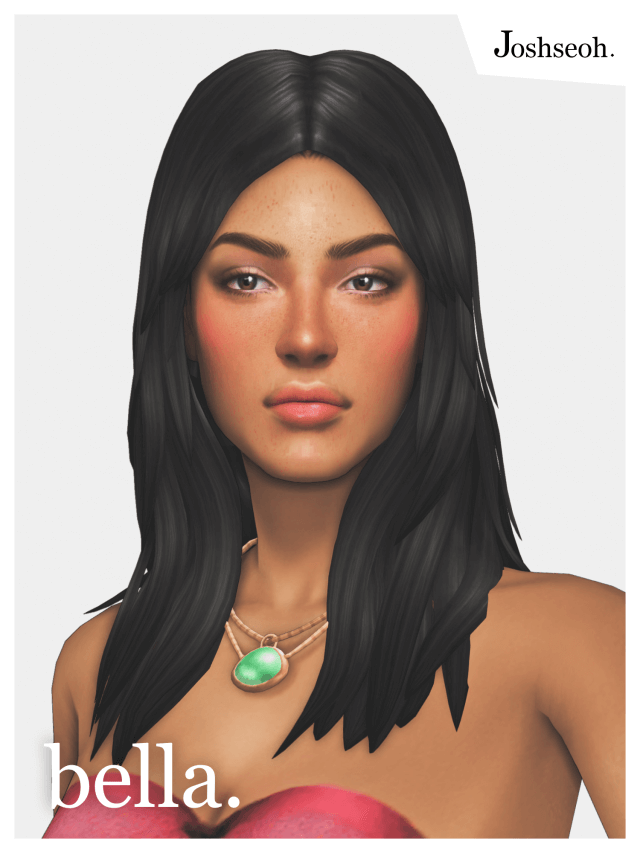
Porting hairstyles from The Sims 3 into The Sims 4 usually ends in a clash of hyper-detailed hair alpha strips and blocky clay geometry. The Bella Hair Sims 4 CC converted by sims4ccworld tackles this challenge by completely translating the classic mid-length feminine haircut into authentic Maxis-match textures. Anyone who spent hundreds of hours exploring Sunset Valley remembers this voluminous wavy style, famously worn by Bella Goth in older franchise entries. Bringing that nostalgic silhouette into modern saves without making it look like a jagged retro relic requires serious sculpting skill.
I installed the package and opened Create-a-Sim to test the mesh on several feminine Sims across teen through elder age groups. The haircut appears under the feminine hair filters with a clear custom catalog preview. The first thing you notice is the volume distribution around the crown. The hair sweeps gently across the forehead with a soft side part, cascading down in layered waves that brush lightly against the shoulders. The silhouette feels full and romantic without ballooning into an oversized wig.
I also tested how the hairline adjusts when tweaking cheekbone height, forehead width, and jawline definitions. On wider jaw shapes, the side tresses drape naturally along the cheek contours without stretching out into sharp polygonal ridges. When narrowing the temple sliders, the roots stay anchored firmly against the skull mesh, ensuring you do not see awkward floating gaps between the scalp and the hair base.
Bella Hair Sims 4 CC Conversion Quality and Wave Clay Mesh
Converting TS3 meshes to TS4 requires creators to rebuild individual strand ribbons into solid clay chunks. If a creator takes shortcuts, the hair ends up looking like melted plastic or a hollow shell. Here, the strand carving is distinct and textured. Subtle groove indentations run along each wave curve, creating natural ambient occlusion shadows that catch light during regular gameplay interactions.
The ends of the hair taper into soft, feathered points around the collarbones. During movement tests in live mode, the vertex weighting holds up well. When my Sim turned her head while talking to neighbors or bent over to weed a garden patch, the chest locks stayed pinned to the torso armature without separating into detached polygon shards. You get minimal chest clipping as long as your Sim is not wearing bulky winter parkas or massive scarf accessories.
Twenty-Four EA Swatches and Ambient Occlusion Shading
The package contains the full lineup of twenty-four official EA color swatches. The dark tones in particular show off the custom normal and specular maps effectively. Jet black retains soft charcoal highlights rather than turning into an unreadable silhouette. Deep chocolate and warm auburn tones feature gentle red undertones that glow warmly under afternoon sunlight in Willow Creek.
The blonde options avoid the infamous cheese-yellow tone that ruined so many early Sims 4 hair meshes. Instead, you get balanced dirty blondes, platinum tones, and warm honey hues. The specular shine stays subtle, providing realistic hair sheen without making your Sim look like they poured cooking oil over their head. Compared to modern wavy styles like the Esmeralda hairstyle, the Bella cut feels distinctly classic and retro, ideal for vintage storylines.
Hat Morph Adaptation on Mid-Length Textured Tresses
Hat compatibility is often where retro conversions fall flat. Many modders skip hat morphs entirely, leaving players disappointed when winter beanies slice right through the hairstyle. Sims4ccworld modeled proper hat morphs for this conversion, allowing your Sims to wear standard headwear throughout cold weather seasons.
I tested the cut with standard wide-brim sunhats, knit beanies, and formal fedoras. When you place a beanie on the Sim, the top volume tucks down smoothly beneath the knit brim, while the lower waves spill out naturally around the shoulders. The front bangs compress without flattening into a muddy texture, maintaining wave definition beneath the hat edge.
Disallowed for Random Tagging and Catalog Organization
A major quality-of-life feature included in this package is the disabled-for-random tag. Nothing ruins the atmosphere of a carefully curated save file faster than seeing randomized townies jogging around Oasis Springs in elaborate vintage conversions. Because the creator properly tagged the file, only Sims you explicitly dress in CAS will wear this hairstyle.
The package is also completely base game compatible, requiring zero expansion packs or stuff packs to function. The file size remains compact, and the custom thumbnail ensures you can locate the item instantly in your catalog without scrolling past dozens of unlabeled custom hairs. The mesh includes proper shadow maps, ensuring the hair casts a believable shadow across your Sim’s forehead and shoulders.
Recreating Classic Legacy Families Across Henford and Willow Creek
I took this hairstyle into an active household in Willow Creek to recreate an alternate timeline Bella Goth. Playing through several game days of domestic routines, reading books in the library, and hosting dinner parties highlighted just how versatile this mid-length cut is. It pairs naturally with vintage tea dresses, tailored trousers, and everyday casual knitwear.
In Henford-on-Bagley, the hair fits the quaint countryside aesthetic beautifully. Walking through the village square during market day, the gentle waves framed my Sim’s face with understated charm. The LOD models downscale smoothly when zooming the camera out to view neighborhood vistas, preventing pop-in artifacts or sudden mesh geometry swaps that distract during live play.
The Bella Hair TS3 to TS4 MM Version succeeds in delivering authentic nostalgia while respecting modern Sims 4 visual standards. Its reliable bone rigging, comprehensive swatch selection, and functional hat morphs make it an indispensable asset for legacy builders and franchise veterans alike.