
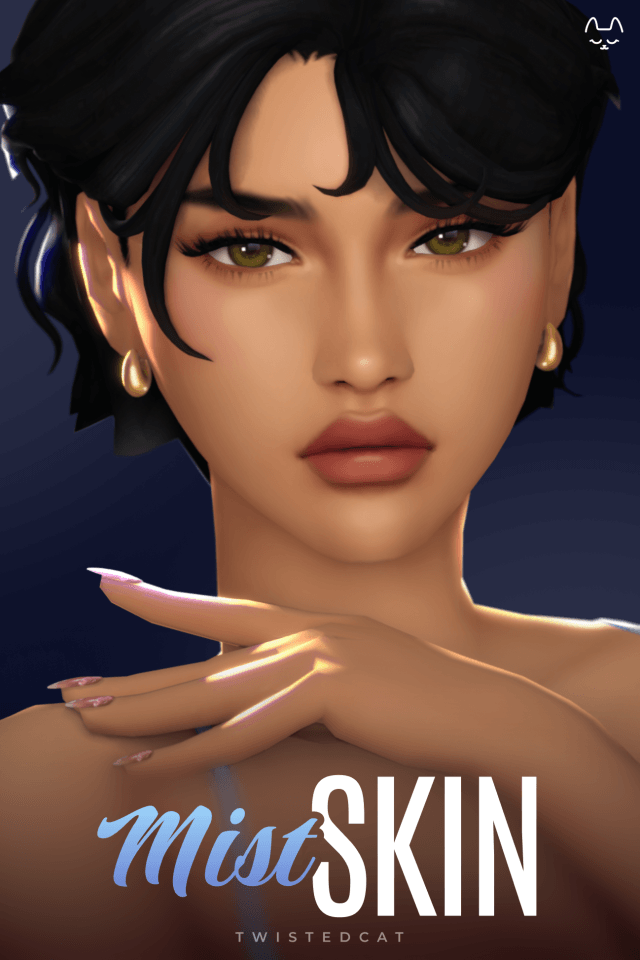
Mist Skin Overlay Concept and Texture Fidelity
Mist Skin introduces a soft, milky-smooth skin overlay that elevates Sims 4 character aesthetics with gentle realism. Designed to soften harsh default EA skin contours without turning Sims into uncanny plastic mannequins, this skin detail emphasizes delicate features, balanced tone gradations, and luminous skin highlights. It brings a fresh, ethereal complexion to Create a Sim, making it an invaluable asset for players who adore soft aesthetics and clean portrait photography.
The texture fidelity focuses on subtle anatomical definitions. Gentle collarbone shading, soft abdominal contours, and delicate knee and elbow highlights give the body natural depth. Around the face, the skin softens the nasolabial folds and enhances the under-eye area with youthful freshness. The lips receive a soft, hydrated sheen, while the nose bridge and cheeks catch ambient light with an organic, dewy glow.
The subtle specular mapping incorporated into Mist Skin gives the complexion a healthy, natural moisture barrier. Rather than looking oily or hyper-reflective, the skin glows softly across the cheekbones, nose tip, and forehead, simulating the radiant look of a disciplined skincare routine under natural sunlight.
Subsurface scattering effects are subtly simulated across the ears and fingertips, creating realistic warmth under sunlight. When Sims move outdoors or stand beneath bright studio lamps, the skin retains soft highlight gradients rather than blowing out into harsh chalky white patches. The result is an ethereal, luminous complexion that looks effortlessly polished.
Modular package options: face and body versatility
One of the most practical aspects of the Mist Skin release is its modular packaging. The creator thoughtfully provided three distinct versions to suit varied styling preferences: face+body, body-only, and face-only. This flexibility is a massive boon for CC enthusiasts who like to mix and match different creators’ face details with custom body overlays.
If you have a favorite face skin blend but want to upgrade default EA body textures, the body-only file integrates seamlessly. Conversely, if you want to keep EA body muscle definitions while smoothing facial features, the face-only package fulfills that need perfectly. This modularity prevents texture clipping and eliminates the frustration of all-or-nothing skin overlays, granting complete creative control.
Styling Synergy and CAS Compatibility
Skin details form the foundational canvas of every Sim, dictating how makeup, hairstyles, and facial features interact.
Makeup layering and aesthetic compatibility
Mist Skin behaves exceptionally well under custom makeup. Because the base texture is soft and evenly diffused, blushes blend smoothly over the cheekbones without creating patchy blotches. Eyeliners and eyeshadows retain sharp graphic lines, while custom lipsticks layer cleanly over the natural lip texture without odd edge discolorations.
The skin provides an ideal canvas for delicate, ethereal characters—fairies, gentle spellcasters, modern fashion models, and romantic heroines. Paired with polished hairstyles like the S-CLUB Long straight-buns hairstyle, it creates an elegant, porcelain-smooth portrait aesthetic that photographs beautifully in live mode. It complements soft pastel aesthetics as well as dramatic high-fashion beauty styles.
The gentle shading under the jawline and along the collarbones provides natural definition without requiring contour makeup. When you do apply custom makeup, the skin’s balanced undertones act as a neutral primer, allowing soft pastel cosmetics and bold graphic eyeliners alike to display with true color fidelity.
Skin tone blending and slider responsiveness
The overlay adapts dynamically to standard game skin tone sliders, preserving warm, neutral, and cool undertone values across the entire spectrum. It does not wash out deeper skin tones or introduce ashy grey casts on darker complexions. Shadow areas retain warm undertones, ensuring that facial depth remains vibrant across diverse cultural backgrounds.
Body slider responsiveness is equally clean. Whether your Sim is slender, muscular, or curvy, the anatomical shading scales naturally along curves without stretching or distorting muscle boundaries. Clavicle lines and rib shading shift proportionally with weight sliders, maintaining anatomical harmony.
Technical Health and Mod Folder Maintenance
Skin overlays sit directly on Sim meshes, meaning clean file optimization is critical to prevent visual glitches.
Texture resolution and performance efficiency
Mist Skin is optimized to provide crisp resolution without ballooning file sizes. The package files are compact and load swiftly in Create a Sim. Because the textures are compressed efficiently, you can equip Mist Skin on every member of a large household without experiencing texture pop-in or live mode stuttering.
The skin detail is assigned to appropriate CAS Skin Detail categories (such as Forehead or Cheek details), allowing it to coexist harmoniously with freckles, beauty marks, tattoos, and body hair. It is not marked for random townie generation, keeping newly generated NPCs from inheriting specific custom overlays automatically. This keeps your game clean and controlled.
Installation steps and troubleshooting
Installing Mist Skin requires placing the chosen `.package` files into your `Documents/Electronic Arts/The Sims 4/Mods` folder. Make sure custom content is enabled in Game Options under the Other tab. The overlay functions with base game compatibility, requiring zero expansion packs.
If you switch between modular versions and notice lingering texture artifacts in CAS, exit the game and delete `localthumbcache.package` from your Sims 4 user folder. The game will generate fresh thumbnail previews upon restarting, ensuring clean display across all CAS categories and preserving pristine visual clarity during your live gameplay sessions.
Suitability and Final Verdict
Mist Skin is an exceptional skin overlay that delivers soft, luminous beauty to The Sims 4. With its delicate facial shading, natural body definitions, and indispensable modular options (face+body, face-only, body-only), it provides creators with a versatile, high-quality canvas for character design.
While players who exclusively build rugged, heavily weathered, or high-grit characters will find the milky-smooth finish too soft for their needs, simmers who love clean aesthetics, romantic storytelling, and portrait photography will adore it. It is a refined, beautifully crafted skin detail that enhances any CAS collection with timeless grace.