
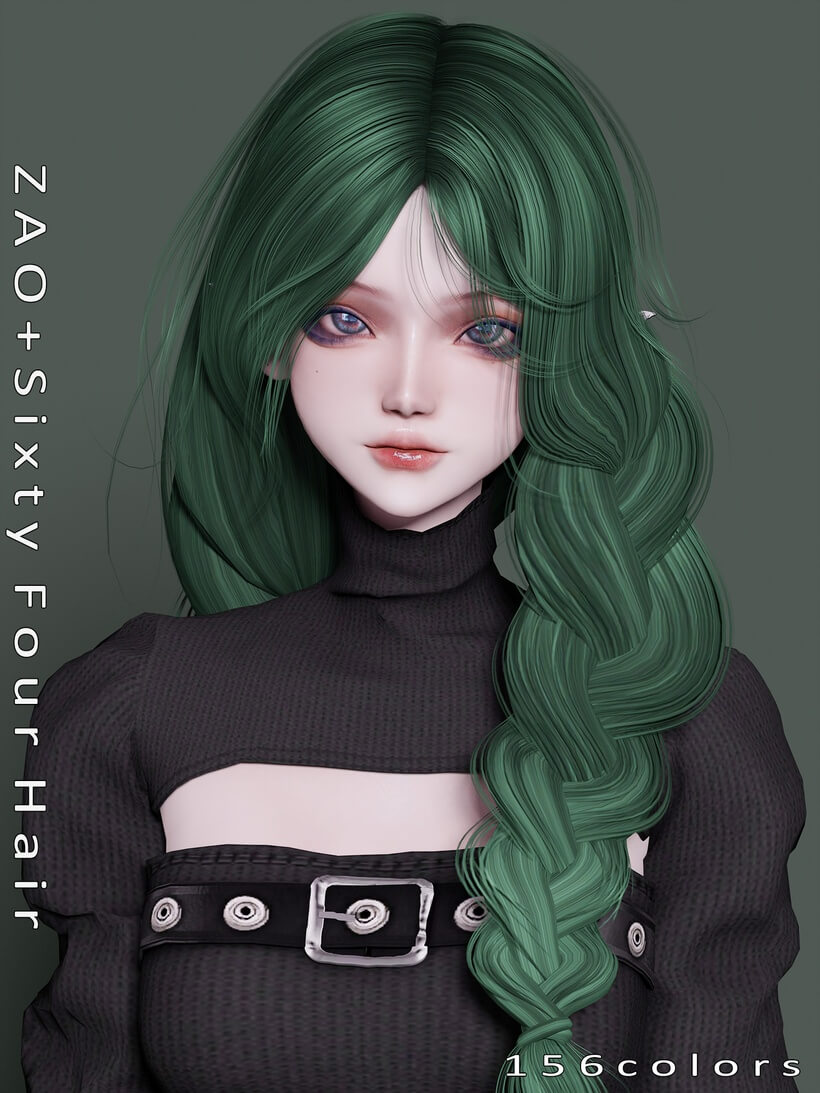
Custom hairstyles often struggle to strike a balance between high-end clay texture fidelity and reasonable in-game performance. When I loaded Sixty Four Hair Sims 4 CC into my testing save, I immediately focused on how the custom mesh handles volume around the crown and nape. Hair assets with dozens of swatches can either become cluttered catalog filler or turn into essential staples for family gameplay, depending on the quality of the LOD meshes and transparency sorting.
I placed my Sim under the bright outdoor sun of Brindleton Bay to inspect the strands against neutral coastal backdrops. The silhouette features clean parted volume that drapes naturally toward the upper back, giving characters an effortless everyday look. With fifty-six distinct swatches included, the creator provided extensive color coverage spanning standard natural tones, pastels, and saturated fantasy shades.
Strand Sculpting and 56 Swatches in the Sixty Four Hair Mesh
The mesh structure relies on solid clay clumping that aligns closely with the official art direction while offering finer strand separation. You do not see coarse individual alpha hairs floating strangely against the scalp, which often causes weird pixel fringing in low-light environments. Instead, the hair strands group into defined layers that reflect the sun with soft, believable highlights.
Cycling through all fifty-six color swatches in Create-a-Sim revealed consistent texture baking across the entire spectrum. The blondes avoid that awkward yellowish neon cast that ruins many custom styles, and the deep brunette swatches retain visible dimension without flattening into solid ink. Fantasy colors like lavender, mint, and dusty rose maintain clean saturation levels that look believable indoors and outdoors. If you enjoy pairing this cut with textured cuts like the Chestnut Curls custom hairstyle, your folder gains substantial variety for family generations.
Each swatch loads with a clean visual thumbnail, allowing you to quickly identify specific undertones without clicking through every single swatch swatch button. The creator included warm and cool variations of red, brown, and grey, which makes finding the right tone for diverse family trees remarkably straightforward.
Hat Compatibility Geometry and Crown Compression
Hat compatibility remains one of the most frustrating aspects of custom hair creation, as many creators simply disable hats entirely. This hairstyle includes dedicated hat chops, meaning the crown geometry compresses realistically when you place headwear on your Sim. I tested several base game beanies, sun hats, and winter caps to see how the mesh adapted.
When placing a knitted beanie on my Sim, the top volume flattened smoothly without pushing jagged polygons through the fabric. The lower strands continued to flow around the ears and neck naturally, maintaining the hair’s signature silhouette underneath the brim. Baseball caps also sat at the correct angle on the forehead without leaving visible bald patches around the temples.
Wide-brimmed floppy hats proved equally cooperative during summer outfit configuration. The front tendrils tucked neatly beneath the hat band, avoiding the harsh clipping lines that usually occur when wide accessories collide with loose hair geometry. Having functional hat support makes this piece especially valuable for seasonal weather changes in Seasons gameplay.
Hairline Alignment and Forehead Proportion in CAS
A poorly positioned hairline can make facial proportions look unnatural, either crowding the brows or creating an excessively high forehead. In this piece, the hairline sits at a balanced height that respects standard Maxis face templates. The baby hairs and sideburn transitions merge gently with default skin details, preventing harsh geometric cutoffs along the cheeks.
I tested the hair with various facial presets, including rounded cheeks, sharp jawlines, and prominent brow bones. Because the strands frame the sides of the face softly, the hair flatters both narrow and wide facial structures. Custom skin overlays and 3D eyelashes remain completely visible, with no texture bleeding between the scalp layer and makeup channels.
Earring visibility also checked out nicely. Small studs and medium drop earrings peek through the side strands without clipping into the inner ear geometry. This clearance ensures that your Sims can wear favorite accessories without awkward mesh tangles distracting you in live mode camera shots.
Motion Physics and Shoulder Collision During Social Animations
Live mode animation stability is where many promising hairstyles reveal flaws, particularly when Sims turn their heads or sit down. I sent my Sim to a busy lounge in San Myshuno to observe social interactions, dancing, and conversational gestures. As Sims laugh and nod, the weight of the mesh holds its shape without tearing at the base of the neck.
When characters sit on deep couches or dining chairs, the back strands rest against the upper back without disappearing into the chair cushion. High-necked turtlenecks and jackets with puffy collars do cause minor collision around the nape, but that is standard for styles of this length. With typical t-shirts, dresses, and light sweaters, the hair settles naturally against the clavicle.
During active workout sessions on gym treadmills, the mesh moves alongside head bones in a unified motion. You will not experience loose floating strands lagging behind your Sim as they sprint or perform yoga routines in neighborhood parks.
Everyday Styling and Performance in Crowded Venues
From a gameplay perspective, this hairstyle fits a broad range of life stages from teens attending high school to adults managing busy careers. It feels casual enough for lazy weekend mornings at home yet polished enough for formal dinner parties or office presentations. The clean parting makes it adaptable to preppy, grunge, or cozy cottagecore aesthetics.
In terms of performance optimization, the creator included full LOD stages, ensuring that distant camera zooms do not strain system memory. During a festival filled with twenty active Sims on screen, game frame rates remained fluid with zero visual hitching. Having reliable assets that render efficiently while providing dozens of color choices makes this custom content item an excellent addition to any CC folder.