
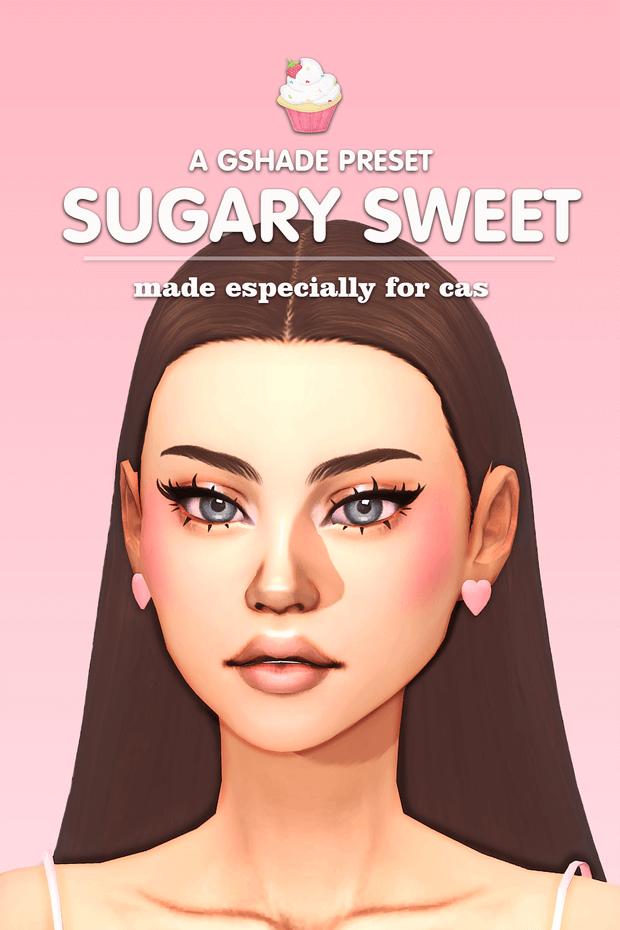
A Gshade Preset – Sugary Sweet Color Grading and Shaders
Adjusting visual atmosphere in Create-a-Sim frequently reveals how harsh base game lighting can wash out pastel color palettes and soften delicate skin makeup. The a gshade preset – sugary sweet configuration file offers a tailored post-processing profile engineered to infuse CAS portraits with warm strawberry milk tones and gentle blooming highlights. By recalibrating color balance curves and applying subtle ambient diffusion, this shader preset softens severe facial shadows while enhancing pastel clothing swatches. The overall look conveys sweet editorial warmth that resembles curated aesthetic social media feeds. Character skin tones gain a luminous glow that mimics high-end studio beauty dish lighting during professional fashion photography sessions.
Inspecting the shader pipeline confirms the integration of refined bloom, mild chromatic aberration, and delicate depth-of-field shaders. The bloom passes are carefully restrained, producing a soft glow around light sources without obliterating fine clothing textures or blowing out light skin complexions. Screenshot creators exploring warm aesthetic shaders can contrast this candy-inspired preset with richer confectionery profiles like the Chocolate Pie GShade Preset to observe how varied color grading shapes character moods. The balanced color palette flatters diverse hairstyles and makeup choices. Subtle edge blur gives distant background elements an ethereal softness while keeping foreground facial features crisp and punchy across every frame.
Create-a-Sim Mode Tuning and Exposure Settings
The primary design intention behind this preset focuses heavily on the Create-a-Sim studio environment. In standard game CAS menus, characters often suffer from flat, directional gray lighting that dulls custom content textures and reduces specular shine. This profile introduces dynamic contrast curve correction that lifts mid-tones and brightens eye highlights, giving characters sparkling, expressive glances. Pores, eyeliner lines, and blush placements read with crisp photographic fidelity under the adjusted exposure. Eye catchlights shimmer with natural reflection, making static character models appear alert and full of personality during detailed makeover sessions.
Exposure curves are tuned to prevent the bright white background of custom CAS rooms from blinding the viewer. Highlight clipping thresholds remain well within safe ranges, ensuring that white clothing items, blonde hair swatches, and platinum jewelry retain distinct texture separation rather than washing out into uniform white voids. Simmers who photograph CC showcases will find that character close-ups require minimal post-capture editing to look publication-ready. The softened whites retain fabric weave textures and lace embroidery that vanilla game exposure settings often erase during bright studio captures.
Live Mode Lighting Behavior and Ambient Darkness Adjustments
While the preset was conceived primarily for CAS modeling, it can also function during active Live Mode gameplay with minor configuration tweaks. The creator transparently notes that because the shaders are calibrated for bright CAS studio backdrops, dark indoor rooms or nighttime outdoor lots in Live Mode can occasionally render darker than intended. Players venturing into gloomy Forgotten Hollow lots or windowless basements may want to adjust the ambient light multiplier within the GShade overlay menu. Adding a few extra lamps or brightening ceiling fixtures inside build mode helps keep indoor spaces balanced throughout evening gameplay.
In well-lit daytime environments, however, the preset adds enchanting warmth to everyday neighborhood activities. Sunny afternoons in Henford-on-Bagley or Tartosa glow with dreamy pastel hues, making flower gardens and cobblestone streets look picturesque and romantic. Foliage greens adopt soft sage undertones, while blue skies shift toward pleasant periwinkle shades. The environmental grading softens the sharp graphical edges of vanilla game worlds. Water surfaces reflect golden sunlight with painterly softness during midday strolls through coastal towns.
Performance Benchmarks and Framerate Optimization
Post-processing presets with multiple active shader stages can often impact GPU performance, particularly on mid-range laptops. The author selected lightweight shader modules that minimize performance drag during active gameplay. Shaders like qUINT Bloom and lightweight color lookup tables operate with low compute overhead, allowing simmers to capture screenshot sessions at smooth framerates without severe stuttering or input lag. Even during complex character animations or crowded lot events, frame times remain consistently low across modern graphics cards.
Toggle hotkeys make it easy for players to switch the preset on and off during active play. Simmers can keep the preset disabled while building lots or managing large households, then activate it with a single keystroke when setting up portrait shots or family portraits. The modest shader stack ensures that GPU temperatures remain stable during prolonged photography sessions. Quick toggle responsiveness enables storytellers to capture spontaneous candid reactions without missing fleeting character gestures during emotional storytelling beats.
Cozy Pastel Storytelling and Screenshot Photography
In active Live Mode gameplay, the preset enriches whimsical family gameplay, romantic dating storylines, and cozy cottage chronicles. Characters sharing romantic meals on outdoor restaurant patios or relaxing in pastel-decorated nurseries appear soft and lovingly rendered. The gentle warmth of the shaders enhances feelings of domestic comfort, making family photo albums feel nostalgic and heartwarming. Storytellers who publish legacy challenges will discover that the unified pastel grading gives episodic screenshot blogs a cohesive editorial identity that enchants readers.
Installation follows standard GShade procedures, requiring players to place the .ini preset file into their game’s shader preset directory for instant menu recognition. Its thoughtful color balance and restrained effects make it an appealing addition to any simmer’s screenshot toolkit. For players seeking sweet pastel tones that beautify CAS portraits without sacrificing clarity, this preset delivers delightful visual charm that flatters every character in your household. It turns ordinary character close-ups into enchanting works of virtual art that preserve character charisma across every album.