
Edwarda Necklace Design and Visual Craft
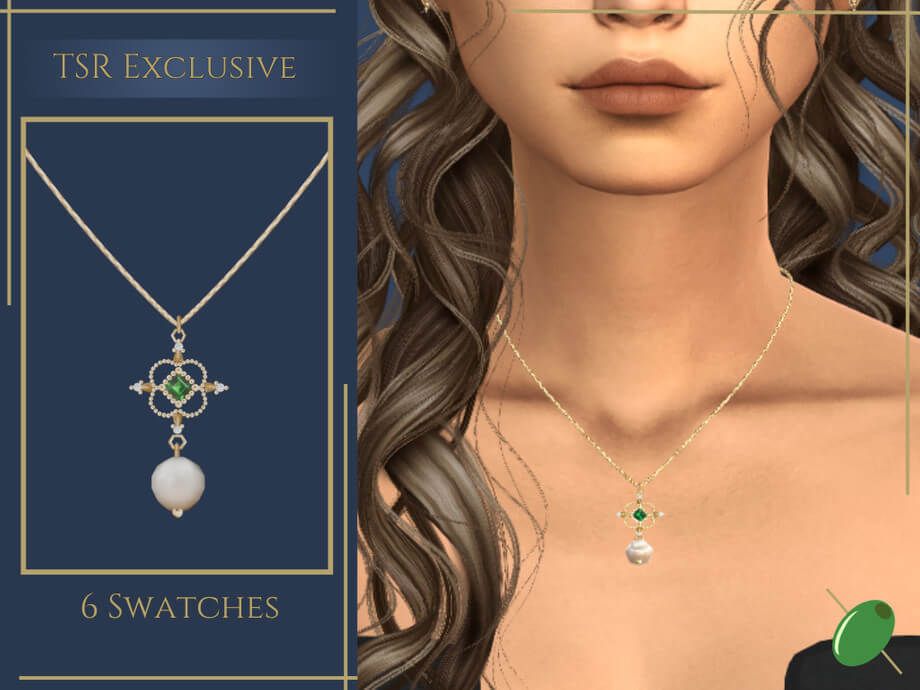
The Edwarda Necklace by creator Pitted0live brings an ornate historical centerpiece to The Sims 4. Centered around a medieval cross pendant anchored by a large pearl, the piece commands immediate focus in Create a Sim. Physical geometry carries dimensional volume, projecting forward from the collarbone with convincing weight.
The custom specular map does critical visual work. As Sims turn under candlelight or direct sunlight, metallic cross arms catch sharp highlights while the central pearl exhibits a softer satin sheen. That textural contrast between antique metal and smooth stone gives the jewelry life during gameplay. Pitted0live avoids shortcuts, ensuring the pendant catches ambient light from every camera angle.
Pendant geometry and catalog presentation
The centerpiece features a cruciform silhouette with stylized terminals that evoke European ecclesiastical relics. At the intersection of the cross rests a large, luminous pearl secured within a raised bezel mount. The proportions are theatrical. This is not a discreet modern chain meant to hide under a blouse; it functions as a dominant focal piece designed to anchor an entire ensemble.
In Create a Sim, browsing through hundreds of jewelry items often becomes frustrating when creators leave default icons. Pitted0live solves this with a custom catalog image displaying the cross and pearl clearly against a clean background. You immediately recognize the download in your necklace grid without guessing, speeding up styling sessions across large saves.
Styling and Wardrobe Pairings in Create a Sim
Because the Edwarda Necklace carries distinct presence and hangs low on the sternum, thoughtful wardrobe coordination makes all the difference between an awkward clipping mess and a striking portrait.
Historical, royal, and fantasy storytelling
Historical simmers will find immediate value here. The necklace feels authentic inside medieval castles, Renaissance banquet halls, and Victorian parlors. Pairing the pendant with velvet gowns, square-cut corsets, or period garments such as the Demoiselle dress instantly communicates nobility. The religious iconography also carries narrative weight for pious queens, abbesses, or strict matriarchs in generational challenges.
Fantasy and occult gameplay offers an equally rewarding canvas. Vampire aristocrats in Forgotten Hollow, gothic spellcasters in Glimmerbrook, and ancient immortals benefit from accessories that signal centuries of accumulated wealth. Against deep crimson, midnight black, or forest emerald velvets, the pendant gleams with dark authority.
Modern gothic and runway styling
Do not pigeonhole this necklace into period saves alone. Modern high fashion routinely borrows ecclesiastical motifs for edgy runway collections and alternative streetwear. Thrown against a tailored black blazer, an unbuttoned silk shirt, or an asymmetrical cocktail dress, the Edwarda Necklace transitions into a high-impact statement accessory. It gives alternative Sims an aura of brooding elegance.
When assembling jewelry suites, restraint preserves balance. Because the cross pendant is visually commanding, pairing it with competing heavy necklaces creates unnecessary clutter around the throat. Combine it instead with delicate ear studs or warm gemstone accents like those found in an amber jewelry set. Keeping surrounding accessories understated allows the central cross to command full attention.
Technical Specifications and Hardware Performance
Evaluating custom content requires understanding how the 3D model interacts with game performance and rendering hardware.
Polygon count and system impact
Pitted0live categorizes the Edwarda Necklace with a high polycount and notes high hardware requirements. Modeling the pearl’s curve, beveled cross arms, and delicate chain links requires far more polygons than standard Maxis items. On capable graphics cards, this extra density yields razor-sharp contours and zero visible facets during close-up portraits.
Players on modest laptops or integrated graphics chips should exercise discipline. Giving the necklace to played household members rarely impacts frame rates. However, generating dozens of background townies wearing high-poly accessories across crowded lots can strain memory. Reserve this piece for active Sims, formal ceremonies, or photo shoots where fine detail matters most.
Package footprint and creator terms
Despite the high polygon density of the mesh, the standalone package file weighs in at a compact 728 KB on disk. It loads swiftly without consuming excessive space in your mods directory. Additionally, because the item is a standalone creation, you do not need to hunt down external mesh dependencies. Everything needed to render the necklace correctly is packaged directly into the single file.
Players should also respect Pitted0live’s creator terms: recoloring is strictly not allowed. The original texture and metal finish represent the creator’s complete artistic vision. While that limitation means you cannot generate pastel recolors, the default finish provides a rich antique patina that fits its intended aesthetic purpose without modification.
Installation Guidelines and Practical Considerations
To enjoy the best visual fidelity in live mode, keep a few practical styling habits in mind.
Garment clearance and hair choices
Because the pendant rests flush against the upper chest wall, garment collar height directly determines whether the piece displays cleanly. The necklace performs flawlessly against bare skin, plunging V-necks, sweetheart bustiers, and off-the-shoulder cuts. High turtlenecks, heavily ruffled cravats, and bulky cold-weather coats will produce visible clipping where the cross clips through cloth.
Sim hairstyles also play an important role. Long hair falling over front shoulders can slice through the chain or hide the upper arm of the cross. Choosing sleek updos, period braids, bun styles, or hair pulled behind the shoulders keeps the jewelry unhindered and fully visible in both gameplay and screenshots.
Installation steps and cache maintenance
Installing the necklace follows standard procedure: place the downloaded package file into your `Documents/Electronic Arts/The Sims 4/Mods` directory. Confirm that custom content and mods are enabled in your Game Options menu under the Other tab. If you ever update the file or notice thumbnail anomalies in CAS, close the game and delete the `localthumbcache.package` file from your root Sims 4 user folder. When you relaunch, the game will automatically regenerate fresh thumbnail caches.
Suitability and Practical Verdict
The Edwarda Necklace fills a valuable niche in The Sims 4 custom content landscape. Detailed historical jewelry with genuine physical depth and reactive specular mapping remains difficult to find, and Pitted0live delivers an exceptional example. The combination of an ornate cruciform silhouette, a lustrous central pearl, and dependable spec mapping makes this accessory feel heavy, storied, and authentic.
While the high polycount requires sensible use on lower-spec hardware, the visual craftsmanship easily justifies the download for storytellers, CAS creators, and historical enthusiasts alike. If your Sims need an opulent heirloom for royal ceremonies, vampire gatherings, or dramatic runway ensembles, the Edwarda Necklace stands out as an impressive addition to any custom content collection.