
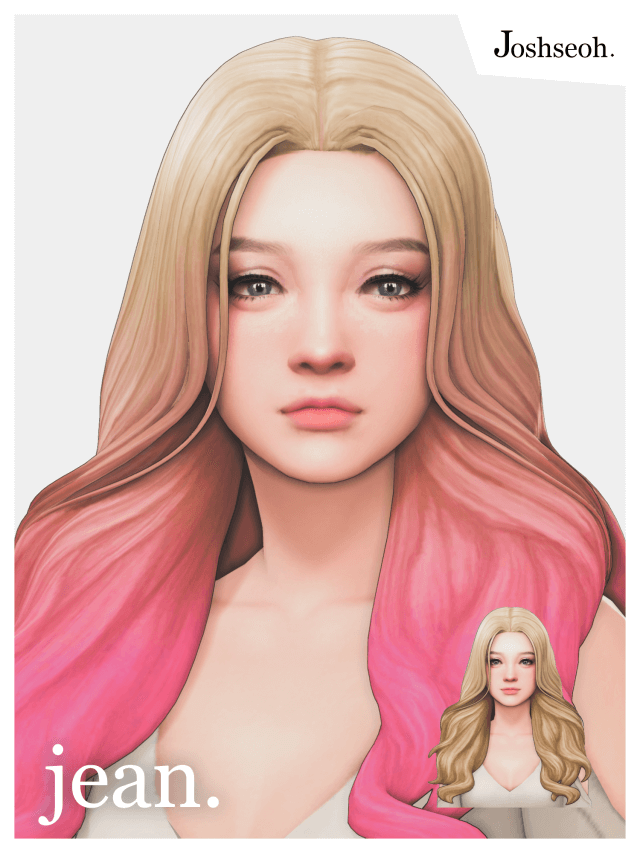
Finding a chic, low-maintenance hairstyle that complements everyday attire is a staple goal for any Sims 4 CC collector. Players often encounter hairs that feature overly dramatic volume or stiff, unwieldy locks that dominate character designs. Testing the Jean Hair Sims 4 CC package by sims4ccworld provided an opportunity to examine a practical feminine hairstyle crafted specifically for clean Maxis Match integration across multiple life stages.
This base game compatible hairstyle is built for feminine frame Sims from teens through elders. It features 24 official EA color swatches, full hat compatibility morphs, a custom CAS catalog thumbnail, and proper normal, shadow, and specular map layers. The package is also configured to disallow random generation on townies, ensuring player control over its use. In this review, I analyze its strand sculpting, color distribution, accessory fitting, and live mode motion.
Jean Hair Mesh Geometry and Strand Composition
The mesh structure of Jean Hair emphasizes clean, flowing lines with subtle strand separation that gives the impression of naturally brushed hair. The clay modeling avoids looking flat by incorporating tiered layers along the sides and back, giving the style pleasant physical presence without excessive bulk.
The hair frames the face with soft curving tendrils that curve gently inward along the jawline. The hairline along the forehead is sculpted with clean edges that avoid unnatural blocky angles. Rotating the camera in CAS reveals a soft crown curve that slopes smoothly down toward the shoulder blades, maintaining clean geometry from every perspective.
The texture work adheres cleanly to Maxis Match standards, employing hand-painted clay highlights that reflect game lighting naturally. The strands possess subtle gradient shading that gives the cut dimensional weight, ensuring that the hairstyle does not flatten out under dim indoor lamps. Individual tips taper neatly without sharp polygonal edges or jagged alpha fringes.
From the rear view, the hair cascades evenly across the upper back. The strands separate naturally without revealing bald spots against the scalp mesh, maintaining full coverage even when Sim heads are angled downward during study or computer interactions.
EA Color Fidelity and Map Implementations
A dependable custom hairstyle must support the full game color system, and Jean Hair delivers on this with all 24 EA swatches properly accounted for. The palette covers standard natural hair colors including warm browns, dark blacks, fiery reds, and golden blondes, alongside the modern pastel additions.
Color grading remains consistent across all tones. The blonde swatches maintain a natural sun-kissed warmth without turning bleached yellow, while darker shades retain strand definition rather than merging into a flat black silhouette. The fantasy swatches, including soft pink and teal, show balanced saturation that harmonizes with base game makeup.
The shadow map casts soft ambient contact shadows onto the temples and neck. This prevents the hair from appearing as if it floats disconnected from the Sim skull, giving the character grounded realism under bright overhead sun in Oasis Springs or Strangerville.
Hat Fit Morphs and Frame Compatibility
Hat compatibility is often where custom hair packages fall short, but Jean Hair includes custom hat morph meshes that adapt cleanly to various headwear styles. Equipping winter beanies, wide brim fedoras, or baseball caps compresses the crown geometry appropriately without causing polygon holes or texture stretching.
The side strands continue to drape naturally beneath hat brims, allowing Sims to maintain their distinct hairstyle even during outdoor winter weather or summer days at the beach. The mesh rigging behaves properly across different skull shapes and ear presets, preventing ear tips from poking through the side layers.
The hair is properly configured for teen, young adult, adult, and elder Sims. Applying the hair to an elder Sim automatically adopts the appropriate salt-and-pepper swatches, allowing legacy characters to age gracefully without losing their signature style.
When pairing the hairstyle with bulky winter coats or thick turtlenecks, the rear mesh rests cleanly against the fabric collar without clipping into heavy winter jackets. This careful mesh clearance makes it an excellent choice for autumn and winter outfits in snowy worlds like Mt. Komorebi.
Assessing Specular Gloss and Normal Depth
The technical texture maps embedded in the package file show disciplined execution. The specular map provides a delicate satin gloss along the crest of each hair wave, mimicking natural hair sheen rather than creating a wet or plastic shine.
Meanwhile, the normal map provides tactile depth between adjacent locks. When moving Sims under directional lighting in CAS, the shadows shift realistically across the grooves between strands. Much like the balanced hair texturing reviewed in Jay Hair, these map layers maintain visual consistency with vanilla EA clothing and accessories.
Everyday CAS Looks and Gameplay Suitability
In live mode gameplay across Willow Creek and Mt. Komorebi, Jean Hair proved remarkably adaptable. The rigging weights anchor cleanly to the head and upper spine bones, ensuring that head rotations during social conversations remain fluid.
During active animations like cooking, jogging, or painting, the hair retains its structural integrity without slicing through the shoulder blades or floating off the neck. The LOD meshes ensure smooth performance across all camera distances, preventing sudden polygon pop-in when zooming out to street view.
Because the creator disallowed random generation for townies, players can assign this hair deliberately to specific family members or university students without seeing it duplicated across the entire town. Jean Hair delivers a dependable, attractive Maxis Match hairstyle that works effortlessly across everyday, formal, and athletic fashion categories, earning a permanent spot in my everyday mod setup.