
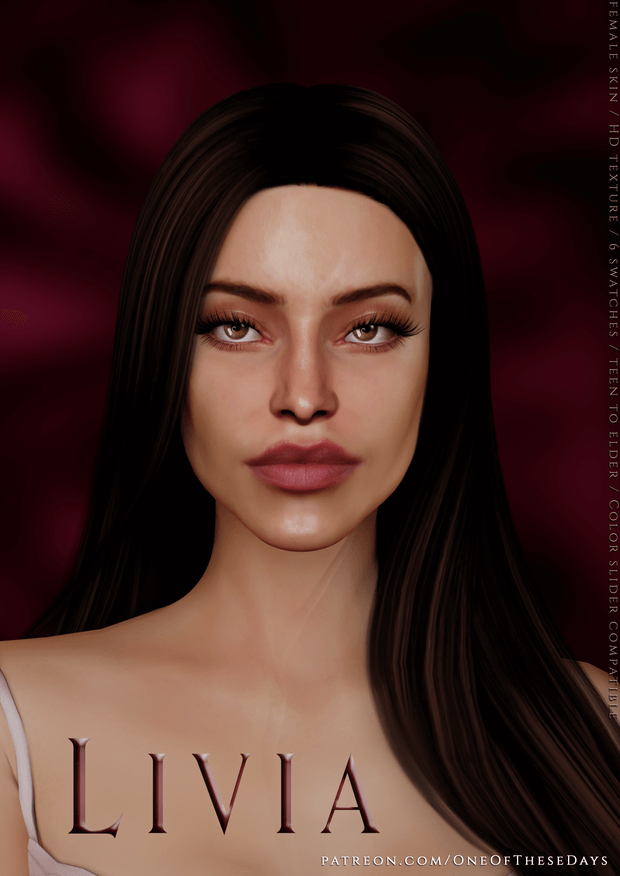
Livia Skin Review: Soft Natural Facial Details in Sims 4
Every seasoned simmer knows that skin details are the true cornerstone of expressive character creation in The Sims 4. Vanilla base game skin textures often look plastic and uniform, washing out delicate facial structures and leaving Sims with flat, cartoonish complexions that lack organic vitality. On the other hand, many custom skin overlays err on the side of hyper-realistic alpha textures that clash jarringly with the game’s stylized world. The Livia SKIN overlay, created by an exceptional custom content artist on Patreon, hits that elusive sweet spot between delicate realism and harmonious stylized charm. I journeyed to the rugged desert canyons of Chestnut Ridge with landscape photographer Sierra Morales to test this skin overlay under harsh natural sunlight.
Before refining your favorite Sims with lifelike skin details or embarking on scenic horseback adventures across the Western frontier, make sure to explore our top picks in the best mods archive, along with passionate frontier romances and authentic character relationships using wickedwhims and wonderful whims to keep your legacy stories vivid.
Morning Sunrise Photography in the Canyons of Chestnut Ridge
Sierra spends her mornings trekking through the red sandstone mesas of Chestnut Ridge, capturing golden hour vistas of wild horses and canyon rivers. In Create-A-Sim, applying the Livia SKIN overlay onto Sierra’s face instantly breathed vibrant life into her features. The skin provides soft, natural contouring around the cheekbones, gentle dimensional shadowing under the lower lip, realistic eyelid creases, and subtle collarbone highlights that give her body organic depth. She looked awake, healthy, and genuinely human without losing her charming Sim identity.
In live gameplay, the skin overlay performs with breathtaking elegance. As Sierra stepped out onto her ranch porch to greet the morning sunrise, the soft highlights on her nose bridge and cheekbones caught the amber light with natural warmth.
Gentle Skin Realism Without Losing Stylized Sim Charm
What makes the Livia SKIN overlay stand out in a crowded landscape of custom skin details is its restraint and textural balance. The creator avoided heavy, aggressive photographic pores or harsh baked-in highlights that freeze a Sim into an unchangeable expression. Instead, the overlay uses delicate hand-painted gradients that enhance the Sim’s underlying bone structure naturally.
The nose shading is particularly exquisite. It defines the bridge and tip with soft, diffused shadows, eliminating that flat, triangular look that often ruins default Sims in profile camera shots. The lips feature gentle vertical micro-creases that make nude and tinted lipsticks look remarkably lifelike.
Ranch Chores, Horse Riding, and Dusty Afternoon Light
To see how the skin details hold up during intense outdoor gameplay, I followed Sierra through a busy day of mucking horse stalls, brushing her palomino mare, and galloping through dusty canyon trails. Under the intense midday desert sun, the skin texture never looked oily, plastic, or blown-out. The soft matte finish absorbs ambient light gracefully, keeping Sierra’s expression crisp and photogenic.
Even when she broke into a sweat while practicing barrel racing in the riding arena, the overlay remained seamless. There were zero visual seam lines between the neck and torso, preserving total immersion across all camera angles.
Seamless Blending Across Diverse Undertones and Overlays
A critical test for any skin overlay is its versatility across diverse skin tones and facial presets. Livia SKIN is available as both a skin blend and a skin details overlay, allowing you to layer it effortlessly over vanilla EA skin tones as well as custom skin color palettes. It adapts beautifully to warm golden, cool rosy, and deep neutral undertones without causing muddy discoloration or ashy grey patches.
The overlay also plays wonderfully with other facial CC. You can layer freckles, subtle blush, custom eyeliner, and beauty marks on top of Livia SKIN without texture fighting or opacity clipping, giving you endless customization freedom.
Exceptional Expression Flexibility During Live Conversations
One of the most common pitfalls of custom skin CC is expression distortion. When a Sim laughs, frowns, or raises an eyebrow, poorly painted overlays can stretch unnaturally, creating bizarre grimaces. Livia SKIN avoids this entirely thanks to weight-conscious mapping that follows the game’s facial blend shapes flawlessly.
When Sierra chatted with local ranch hands at the neighborhood saloon, sharing laughs over cold drinks, her facial animations looked fluid and natural. Her smile lines creased softly, her eyes crinkled with genuine emotion, and her cheeks maintained their healthy, sun-kissed glow.
Evenings by the Campfire and Guitar Melodies
As darkness settled over the vast desert plains, Sierra sat by an open campfire outside her cabin, tuning an acoustic guitar under a sky filled with twinkling stars. Under the flickering amber glow of the fire, the Livia skin overlay looked mesmerizing. The subtle collarbone definition and soft chin shading caught the dancing firelight with cinematic grace, making every close-up portrait look like a frame from an indie western film. Her face carried a peaceful, grounded warmth that brought immense emotional depth to her frontier lifestyle. The natural skin contours gave Sierra an authentic, grounded radiance that made every campfire screenshot feel genuinely heartwarming, lifelike, and deeply memorable.
A Must-Have Skin Overlay for Authentic Character Storytelling
The Livia SKIN overlay is an indispensable custom content asset that brings understated realism, beautiful anatomical contouring, and artistic elegance to The Sims 4. It breathes vibrant life into your Sims’ faces, ensuring that every glance, smile, and conversation feels emotionally authentic and visually captivating. If your Sims are ready to shed their plastic complexions and embrace natural, radiant beauty, whether you are crafting grounded rural dynasties in Chestnut Ridge, designing glamorous urbanites in San Myshuno, or capturing candid family legacy portraits in Willow Creek, this skin overlay delivers unmatched polish in every single moment. Download the Livia SKIN overlay today and let your Sims glow with natural grace.
Credit: Patreon