
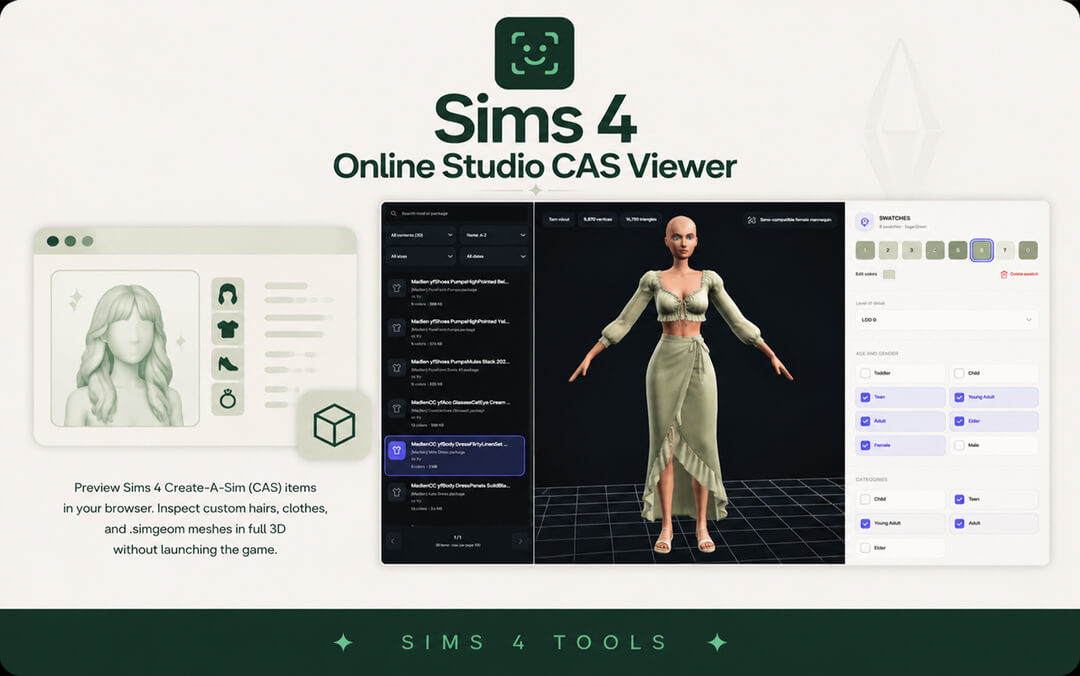
Sims 4 Online Studio CAS Viewer Core Purpose and 3D Engine
The Sims 4 Online Studio CAS Viewer introduces a cutting-edge web solution designed to solve the single most frustrating bottleneck in character custom content management: waiting through long game startup screens just to test custom clothing, hairstyles, and accessories. Custom content hoarders frequently find themselves with hundreds of new CAS items, uncertain how textures drape on Sim bodies or whether mesh vertices explode under standard animation rigs. This browser-based utility delivers instantaneous, high-fidelity 3D rendering of CAS packages without demanding heavy desktop software installations.
At the center of the application is a custom WebGL rendering engine engineered specifically to parse proprietary EA `.simgeom` mesh formats directly in real time. Rather than presenting a flat, unlit geometry preview, the viewer calculates advanced PBR shading calculations that accurately interpret diffuse color textures, normal bump relief, specular shininess, and shadow ambient occlusion maps simultaneously. You witness exactly how an outfit or hairstyle will display inside The Sims 4 engine under pristine lighting.
All file handling takes place locally within your computer’s browser cache. Whether you drop a solitary package file or dump an entire fifty-gigabyte folder of custom garments, your files are processed securely through client-side scripting. No assets are ever uploaded to remote cloud servers, preserving creator confidentiality and ensuring blazing fast file processing speeds.
Complete 360-degree inspection and texture map analysis
The 3D studio viewport gives stylists and 3D creators unrestricted visual control. Using standard mouse controls, you can orbit around the model 360 degrees, tilt the camera upward to inspect under-skirt geometry, and zoom in close to examine delicate lace hemlines and hairline baby hairs. High-resolution texture maps render smoothly without downsampling artifacts, allowing you to catch pixelated seams or misaligned UV islands instantly.
Evaluating complex multi-layered clothing pieces—such as the intricate sleepwear from the Sleepover Set of 4 items—becomes effortless. You can verify that sleeve cuffs line up with wrist seams, check collar elevations, and confirm that waistbands do not slice into lower abdominal geometry before placing items into your active gameplay saves.
The viewer also supports toggling between flat unshaded color views and full normal map relief. This lets creators confirm that fabric ribbing, zipper teeth, and leather grain cast believable micro-shadows under directional light sources.
Mods Folder Organization and Triage Efficiency
Beyond visual evaluation, the Online Studio CAS Viewer serves as a powerful triage utility for players dedicated to maintaining clean, error-free mods directories.
Isolating broken meshes and missing textures
Every simmer has encountered the dreaded question-mark skin glitch or missing mesh silhouette in Create a Sim caused by broken recolors or missing mesh dependencies. Running your recent downloads through the CAS Viewer immediately exposes unlinked mesh definitions and corrupted texture references. Faulty packages are flagged immediately in the left-hand asset hierarchy, allowing you to delete defective files before they ever pollute your active save games.
The tool displays vertex and polygon counts prominently on the upper interface bar. When sorting through dozens of trendy alpha hairstyles or high-fashion gowns, you can immediately identify uncompressed models packing excessive polygon counts that would degrade live simulation frame rates. This level of transparency protects your game performance from lag-inducing CC.
Folder scanning and batch navigation
The left navigation sidebar presents a clean, searchable index of all parsed CAS assets. Items are automatically categorized by type, separating tops, bottoms, full-body outfits, hairstyles, shoes, and facial accessories into logical groupings. Clicking any item instantly switches the 3D viewport without reload delays, enabling rapid triage of massive CC hauls in a fraction of the time required by traditional methods.
For players sharing curated custom content lookbooks or CC starter packs, the viewer provides a swift verification step. You can confirm that all package components load properly and match catalog previews before distributing links to community followers.
Accessibility, Compatibility, and Technical Health
The platform eliminates technical barriers by delivering high-end 3D inspection capabilities across every operating system equipped with a modern web browser.
Cross-platform flexibility without installation hassles
Traditional Sims 4 modding suites have historically been locked to Windows desktop environments, leaving Mac users and Linux gamers struggling with complex emulators or virtual machines. The Online Studio CAS Viewer runs natively across macOS, Linux, Windows, and ChromeOS via standard WebGL standards. It requires zero configuration, zero administrative permissions, and zero disk space overhead.
The application manages system memory responsibly through automated garbage collection. Once you finish reviewing a folder and close the browser tab, all allocated graphical resources are released cleanly, preventing system slowdowns or GPU memory leaks.
Creator prototyping and quality assurance
For 3D artists and texture recolorists, the viewer accelerates iteration speeds significantly. After exporting a modified `.simgeom` file or adjusted diffuse DDS texture from Blender or Photoshop, you can drop the package directly into the browser to check lighting transitions instantly, avoiding the tedious process of launching game instances repeatedly.
Lighting simulation inside the viewport can be toggled between direct midday sunlight, soft indoor incandescent illumination, and dramatic rim lighting. This multi-environment testing allows recolorists to ensure their bump maps and specular shine values react naturally across all in-game time cycles without blowing out into harsh white highlights.
Suitability and Final Verdict
The Sims 4 Online Studio CAS Viewer is an extraordinary breakthrough in custom content management, delivering desktop-grade 3D mesh rendering and texture inspection directly within a web browser. The combination of complete `.simgeom` support, multi-map PBR shading, secure local processing, and rapid folder triage makes it an indispensable asset for any fashion-forward simmer.
While simmers who strictly play with vanilla Maxis content will have little need for 3D asset inspectors, anyone who regularly downloads custom hair, garments, and accessories will wonder how they ever managed without it. It turns tedious mods folder maintenance into a fast, satisfying visual experience that preserves your game stability.