
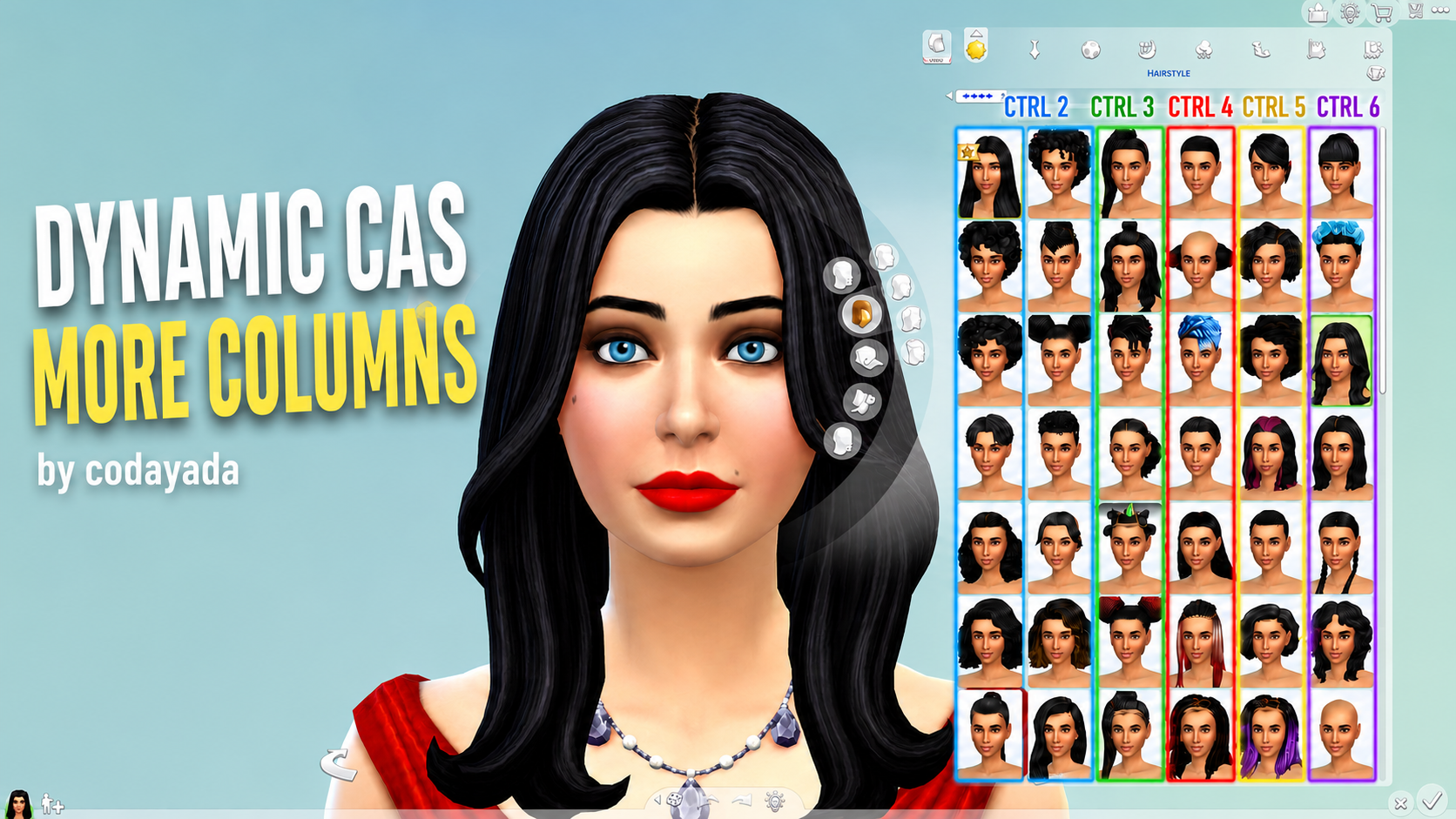
Dynamic CAS More Columns by Codayada Overview and UI Evolution
The Dynamic CAS More Columns mod by Codayada introduces one of the most innovative, convenient, and long-awaited quality-of-life advancements into The Sims 4 user interface modding ecosystem. For years, Simmers with extensive custom content folders have relied on traditional multi-column mods to expand their Create a Sim catalog view from the default two columns up to three, four, or five columns. However, legacy column mods have always suffered from a frustrating limitation: players had to choose a fixed column width in their Mods folder, requiring a complete game restart and file swap whenever they wished to change column counts. Codayada completely transforms this dynamic by allowing players to switch column widths in real time with simple keyboard shortcuts while actively playing.
The mechanics of the mod are both elegant and remarkably responsive. While inside the Create a Sim interface, players can instantly switch between two, three, four, five, six, or seven columns simply by pressing Ctrl plus the corresponding number key (Ctrl+2 through Ctrl+7). If you are browsing a massive collection of custom hairstyles and want an expansive panoramic view across an ultrawide monitor, pressing Ctrl+7 opens an expansive seven-column catalog layout. If you subsequently zoom in to fine-tune delicate facial details or makeup opacity and need more screen space for the Sim’s face, pressing Ctrl+3 instantly shrinks the catalog window without a hitch.
Technical execution adheres to lightweight modern modding principles. Packaged as a streamlined package file without heavy Python script overhead, the mod interacts directly with the game’s UI architecture with lightning responsiveness. It produces zero UI lag, stutter, or performance degradation, maintaining smooth framerates even during prolonged styling sessions.
Customizable starting defaults and intuitive hotkey shortcuts
A major design strength of Codayada’s mod is its customizable installation process. Inside the downloaded archive, players can select their preferred starting default column count—choosing whether the game launches by default with standard, 2, 3, 4, 5, 6, or 7 columns. Simply place your chosen default package file into your Mods directory, and the game will open CAS in that exact layout every time.
Once inside Create a Sim, dynamic hotkey switching provides total operational freedom:
– Ctrl + 2: 2-Column layout (ideal for smaller laptop displays)
– Ctrl + 3: 3-Column layout (classic balanced catalog view)
– Ctrl + 4: 4-Column layout (popular standard for 1080p monitors)
– Ctrl + 5: 5-Column layout (optimal for 1440p displays)
– Ctrl + 6: 6-Column layout (exceptional for wide monitors)
– Ctrl + 7: 7-Column layout (the ultimate layout for ultrawide 4K screens)
This effortless flexibility makes organizing and browsing large custom content collections—including tops, jewelry, and shoes—a genuinely enjoyable and frictionless experience.
Everyday Gameplay Benefits and Styling Workflow Enhancements
A dynamic UI column switcher functions as an indispensable utility across massive CC sorting sessions, character creation, and community lookbook design.
Ultrawide monitors, laptop gaming, and massive CC libraries
Dynamic CAS More Columns is custom-tailored for every type of player, from laptop gamers with compact screens to high-end desktop enthusiasts with curved ultrawide monitors. Browsing through hundreds of custom hair options like the Ophelia Hair or extensive clothing sets like the Rebel Muse set becomes vastly faster and more organized when you can expand the catalog grid with a single keystroke.
To further enrich your gameplay with enhanced life simulation mechanics, relationship depth, and realistic storytelling progression, exploring our curated best mods will create a richer gaming experience. The mod also pairs seamlessly with other essential UI utilities such as UI Cheats Extension and More Traits in CAS.
Frictionless switching during portrait and detail work
The ability to shrink the catalog width back down to two or three columns with Ctrl+2 or Ctrl+3 is a game changer when adjusting fine facial details. When applying skin overlays or testing custom eyes like the Ripple Eyes, having unobstructed visual access to character facial expressions ensures flawless aesthetic decisions without catalog menus blocking the view.
The instant transition ensures that your creative flow remains completely uninterrupted from the first genetic adjustment to the final outfit selection.
Technical Installation and Mod Compatibility
User interface mods require disciplined file management to ensure smooth operation alongside game patches and other UI modifications.
Clean package structure and patch maintenance
Codayada engineered the mod as a clean, lightweight package file that does not interfere with game core scripts. Installing the mod requires simply dropping your chosen default package file into `Documents/Electronic Arts/The Sims 4/Mods`. Because UI mods interact closely with game interface files, players should verify that custom content and script mods are enabled in Game Options.
Whenever EA releases major game updates or expansion patches, clearing `localthumbcache.package` and checking the creator’s page for updated versions ensures complete interface stability without broken UI icons or overlapping text strings. The mod is fully base game compatible, requiring zero DLC expansion packs to enjoy.
The absence of background script polling guarantees that CPU usage remains unaffected, allowing the game to run at maximum performance during live mode simulation.
Base game compatibility and installation
The Dynamic CAS More Columns mod is completely base game compatible, requiring zero expansion packs to install and use. Simply copy the package file into your Mods directory and ensure custom content is enabled in Game Options.
Compatible with all modern Windows and macOS systems, it performs with complete graphical consistency across all monitor resolutions and aspect ratios.
Suitability and Final Verdict
Dynamic CAS More Columns by Codayada is an outstanding, revolutionary custom utility release that brings real-time hotkey column switching, customizable starting defaults, and lightweight package engineering into The Sims 4. The combination of instant Ctrl+2 through Ctrl+7 shortcuts, zero performance lag, and broad screen resolution support makes it an indispensable tool for every simmer’s mods folder.
Whether you manage thousands of custom content files, play across diverse monitor setups, or simply desire total control over your Create a Sim layout, this download provides unmatched convenience and modern functionality. We enthusiastically recommend downloading Dynamic CAS More Columns to elevate your character styling workflow to effortless perfection.